
1-1 Features:
- Pibiger SavvyCAN Series Products are SocketCAN devices;
- Officially provide SavvyCAN Software support CAN FD;
- Compatible with Busmaster,Socket CAN,etc...
- CAN FD bit rates from 25 kbit/s max up to 12Mbit/s;
- Timestamp resolution up to tp 1μs;
- Each CAN FD Signal&Power Separately isolated against USB Up to 2.5KV;
1-2 How to Use On Windows
Step1, Download Install Software
1.1 Driver
Step2, Connection
2.1 Connect USB A To Computer. Check from device manager see CAN Hardware

2.2 Open Savvy CANFD Software We provide
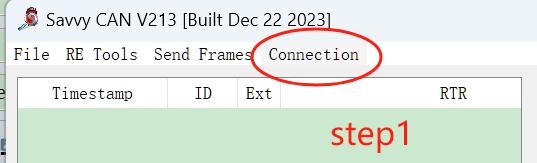
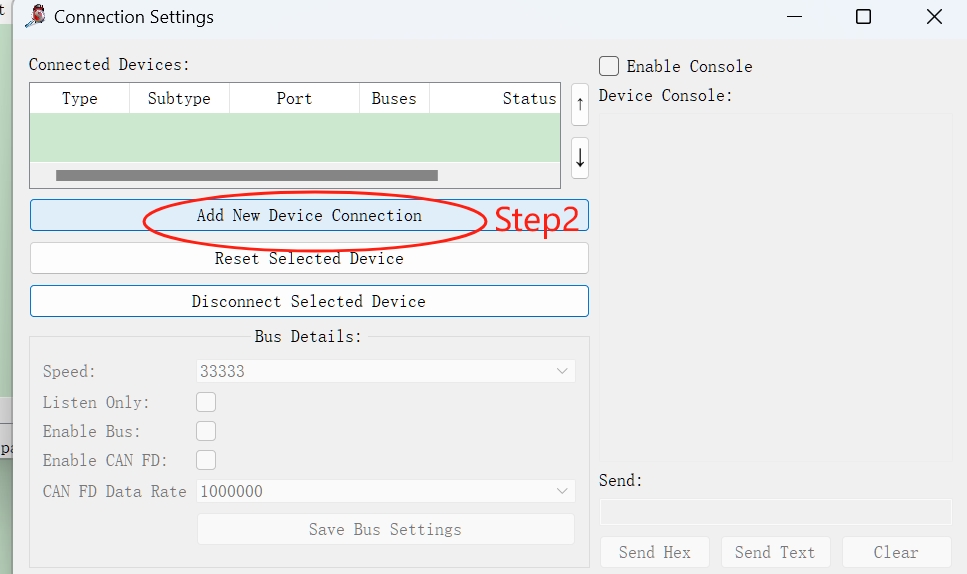
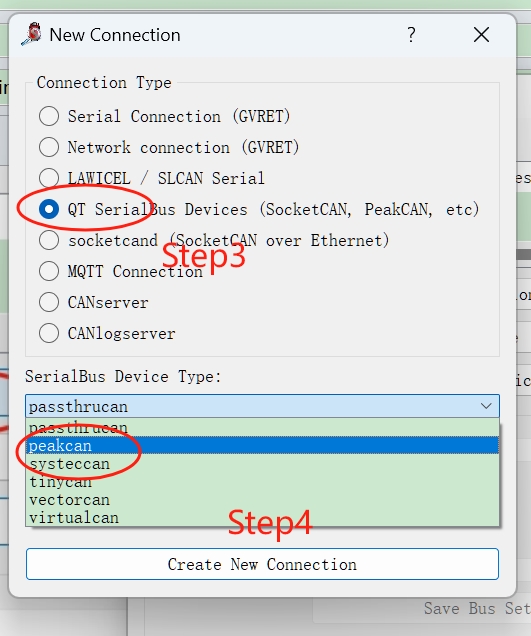
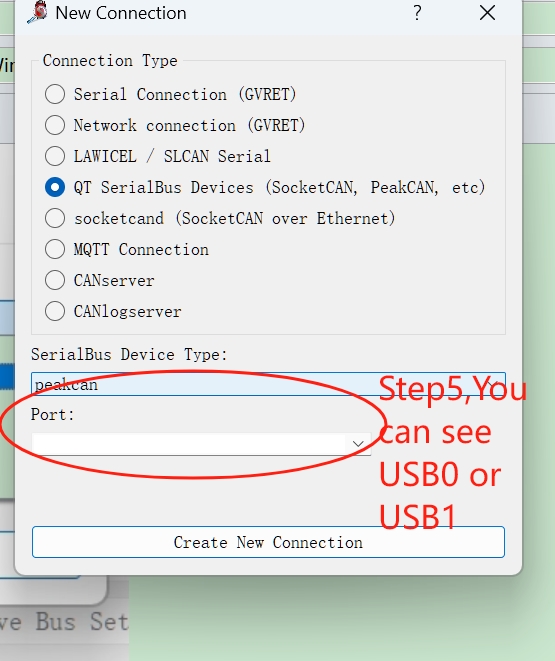
Step3, CAN Speed/CAN FD Data Rate
3.1 How to set CAN Speed and Data Rate

Step4,Internal 120Ω Termination Resistor
See Internal 120Ω Termination Resistor.
Step5,CUSTOM Nominal/Data Bit Rate
See Custom Nominal Data Bit Rate.
1-3 How to Use On Linux
Method 1: Download pre-compiler APP
https://github.com/collin80/SavvyCAN/releases/
// Download Address:
https://github.com/collin80/SavvyCAN/releases/

1.1 - Install the pre-compiled SavvyCAN
1.2 - Double click on SavvyCAN.app
Method2: Download Source Code and compiler
https://github.com/collin80/SavvyCAN
bash
Instructions for compiling:
Download the newest stable version of Qt directly from qt.io (You need 5.14.x or newer)

cd ~

git clone https://github.com/collin80/SavvyCAN.git

cd SavvyCAN

~/Qt/5.14/gcc_64/bin/qmake

make
Now run SavvyCAN

./SavvyCAN
On linux systems you can run ./install.sh to create a desktop shortcut.

Compiling in debug mode for additional information
qmake CONFIG+=debug

make
What to do if your compile failed?
The very first thing to do is try:

qmake

make clean

make
Method3 Linux_Soft_SocketCAN
1-4 How to Use On Mac Os
Please refer to below
See Use On Mac Os>.
1-5 Internal 120Ω Termination Resistor
Please refer to below
</downloadsuser-manual/internal-120o-termination-resistor>
1-6 CUSTOM Nominal/Data Bit Rate
Please refer to below
See Custom Nominal Data Bit Rate.
1-7 Change Product ID For Difference OS
</downloadsuser-manual/change-product-id>